The manual.
Everything WBTRK does, in the order you will meet it — a five-minute quick start, then every page, every engine and every effect, on iPhone, iPad and Mac. If you have never used a tracker before, start at the top. Written for version 3.3.2.
The idea
A tracker writes music downwards. Time runs from the top of the screen to the bottom, one row per step, and you type what happens on each step instead of drawing it on a timeline. It is fast, it is exact, and it fits a phone.
WBTRK has three levels, and everything else hangs off them:
- PHRASE — the notes. A short pattern, 16 steps by default. This is where you write music.
- CHAIN — a list of phrases, played in order. This is how a one-bar idea becomes a verse.
- SONG — twelve channels of chains, side by side. This is the arrangement.
The other pages serve those three: INS is the sound a note plays with, FX the effects a row can fire, TB little programs that run under a note, MX the channel levels, PRJ files and song settings, and OPT everything about the app itself. LIVE MODE, opened from PRJ, plays the phrases you wrote by hand.
On the iPhone the pages are tabs, one screen at a time (two side by side when the phone lies down). On the Mac and the iPad they share one window — see The Studio window.
Every page has a ? button that explains that page, in the app, at the moment you need it.
Quick start
Five minutes, from an empty app to a loop you wrote.
- Open the app on the PHR page. The grid is empty: 16 rows, four note columns (N1–N4), an instrument column (INS), a velocity column (VEL) and two effect columns (FX1, FX2).
- Hold the N1 cell on row 00 and slide: up or down steps the note and plays it as it goes, a longer move across jumps an octave, and lifting your finger writes it.
- Double-tap N1 on row 04: that places the same note again and plays it. Do the same on rows 08 and 12.
- Press ▶ in the top bar. The phrase loops while you edit — keep adding notes with it running.
- Change the sound: on INS, tap global presets and pick a sound — the ▶ at the end of each row plays it first. Back on PHR, your notes play with it.
- Make it a part: on CHA, double-tap row 00 — it drops in the phrase you just used. Add it again on rows 01–03 for a four-bar loop.
- Arrange it: on SNG, double-tap row 00 of channel 1 to place your chain. Press ▶ — that is a song.
- Keep it: the app autosaves on its own, and PRJ → save song writes it out as a file.
The gestures
The same three gestures work on every grid — phrase, chain, song and table. Learn them once. The tabs at the top change pages.
| gesture | what it does |
|---|---|
| tap | selects the cell |
| double-tap | places the last value you used — the whole chord, if a chord was last — or clears the cell if it is already filled. Either way it auditions. |
| hold and slide | changes the value: up or down steps it, a longer move across is the big step (an octave on a note, one in the high digit on a number), lifting writes it. INS and FX cells open the list of every instrument or effect instead; on a DRUM KIT row a note cell lists the kit's ten slots. |
With a keyboard or a game controller the same edits have keys — see Keyboard & game controller. On the Mac the mouse drags the same way — see The Studio window.
The slide
Hold a note cell and slide: the note steps and plays as your finger moves, so you can hunt by ear, and the value shows in the cell and in a pill at the top of the screen as it changes. Lift to write it; undo takes it back. If the instrument has SCALE turned on, only in-key notes are offered. The slide places one note at a time — N2–N4 are slid the same way for a chord. VEL slides too, and so do the chain, song and table cells.
Prefer the radial wheel of earlier versions, with its CHORDS tab and the two-ring velocity wheel? OPT → LEGACY SETTINGS → note entry → wheel.
Undo
↶ ↷ in the top bar undo and redo any edit, on every page. They are always there.
Keyboard & game controller
On the Mac and on an iPad with a keyboard attached, the whole tracker has keys. On any of the three, a Bluetooth game controller has buttons.
The keyboard
| key | what it does |
|---|---|
| arrows | move the cursor — past the first column onto the row number, and the grid scrolls to keep the cursor in view |
| 0–9 | type a value straight into the cell |
| ENTER | fills an empty cell with the last entry; a double ENTER is the double tap |
| ⇧ + ↑ ↓ | nudge the value by 1 · ⇧ + ← → by 16, an octave on a note |
| Delete | clears the cell |
| z x c · a s d | those two rows are a piano on every page, playing the selected instrument ([ ] change octave). Hold several for a chord. The keys always sound and write only while rec is armed; ` writes OFF |
| Q / E | step the number of the page's chain, phrase, instrument, fx or table |
| Space | play / stop — on the Mac it plays what the keyboard is in: a phrase loops that phrase, the chain the chain, anywhere else the song |
| Tab / ⇧Tab | next / previous page, or part of the window on the Mac and iPad |
| ⌘Z / ⇧⌘Z | undo / redo |
| ⌘R | arms record |
| ⌘C | copies: the whole row on the row number, one value inside a row; hold it and press ↓ to take more rows, let go to copy |
| ⌘V | pastes from the cursor down, onto the same kind of row or column |
| ESC | closes a list, or leaves a text box |
On INS and FX a row cursor walks the parameters: ↑ ↓ pick the row, ← → press its ◀ ▶ or − +, ENTER presses a key. On the mixer ← → pick the strip, ↑ ↓ move its fader, ENTER mutes and a double ENTER solos.
The game controller
Pair any extended pad over Bluetooth — PlayStation, Xbox, Switch Pro or MFi. The d-pad and the left stick move the cursor (held, they repeat; the stick's tilt sets the speed). Hold the enter button and press the d-pad to nudge the value under the cursor: ↑ ↓ by 1, ← → by 16 or an octave — the LSDJ way, no picker needed. The right stick nudges too.
Every button can be given a job under OPT → CONTROLLER: enter, clear, play/stop, record, page ◀ ▶, undo, redo, copy (hold it and press ↓ to take more rows), paste, octave − +, live, cancel, OFF, or slot − + (the number of the page's chain, phrase, instrument, fx or table). The standard map: A enter (a double A clears) · B copy · X play/stop · Y paste · L1 / R1 pages · L2 / R2 slot − + · L3 / R3 undo / redo · options record. B always closes a window. Every edit sounds what it wrote; turn that off with preview while editing on OPT.
PHR · phrase
Where the music is written. Each row is one step in time and holds up to four notes (a chord), an instrument, a velocity and two effects.
04G-4 A#4 --- --- 01 ARP DELY
- N1–N4 — the notes. Four columns means four-note chords; most of the time you will use N1 alone. OFF in a note column lets the channel's note go, so it ends exactly on that row and plays its release.
- INS — which instrument plays this row. Leave it empty and the channel keeps the instrument it was already using.
- VEL — velocity: how hard the note is struck, 1–127. Blank means full — every song written before the column existed sounds exactly the same. A MIDI keyboard records its real velocities in here; hold and slide to set one by hand. It scales the note's loudness, so one phrase can carry its own dynamics.
- FX1 / FX2 — up to two effect slots fired on this row.
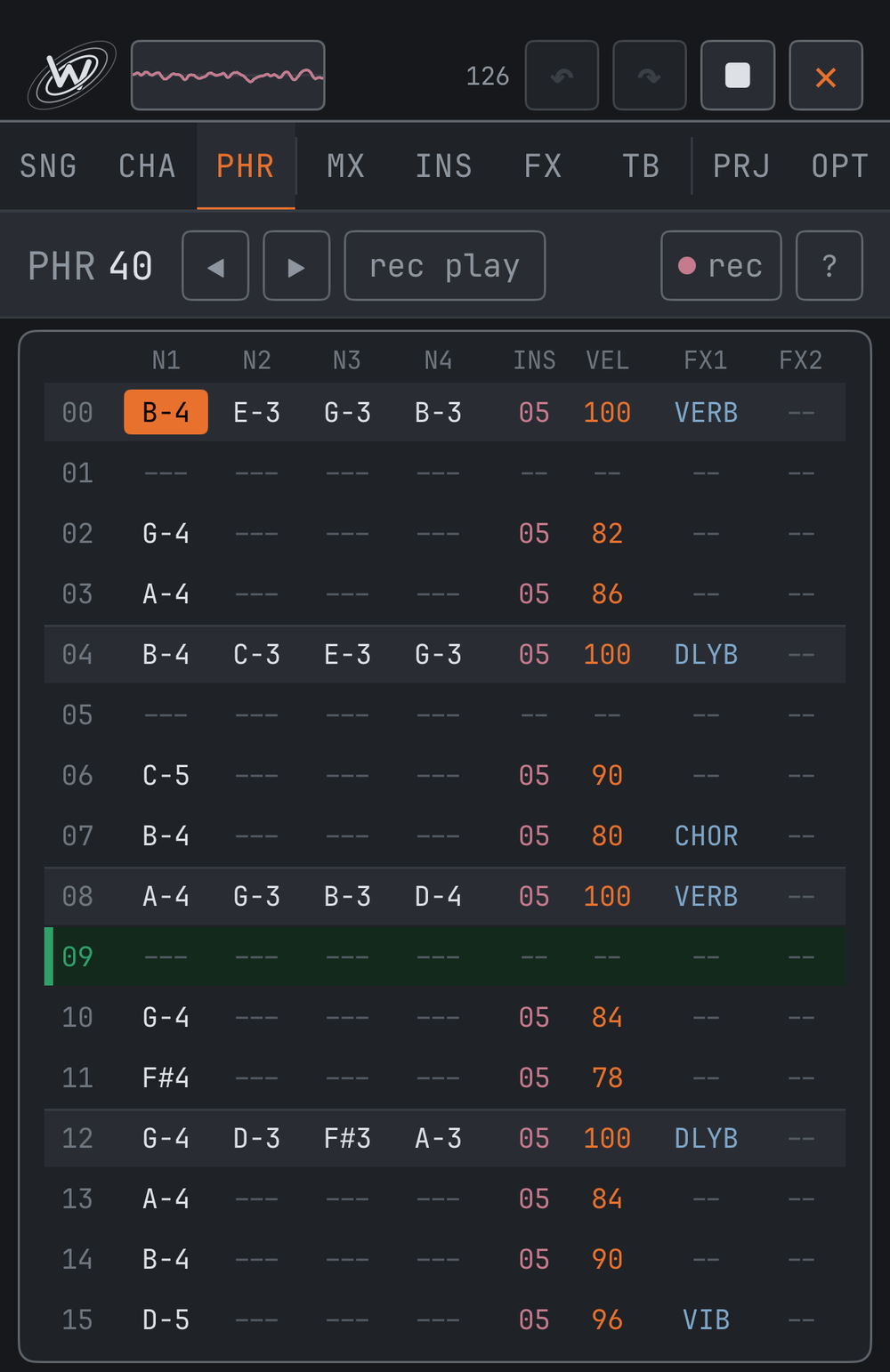
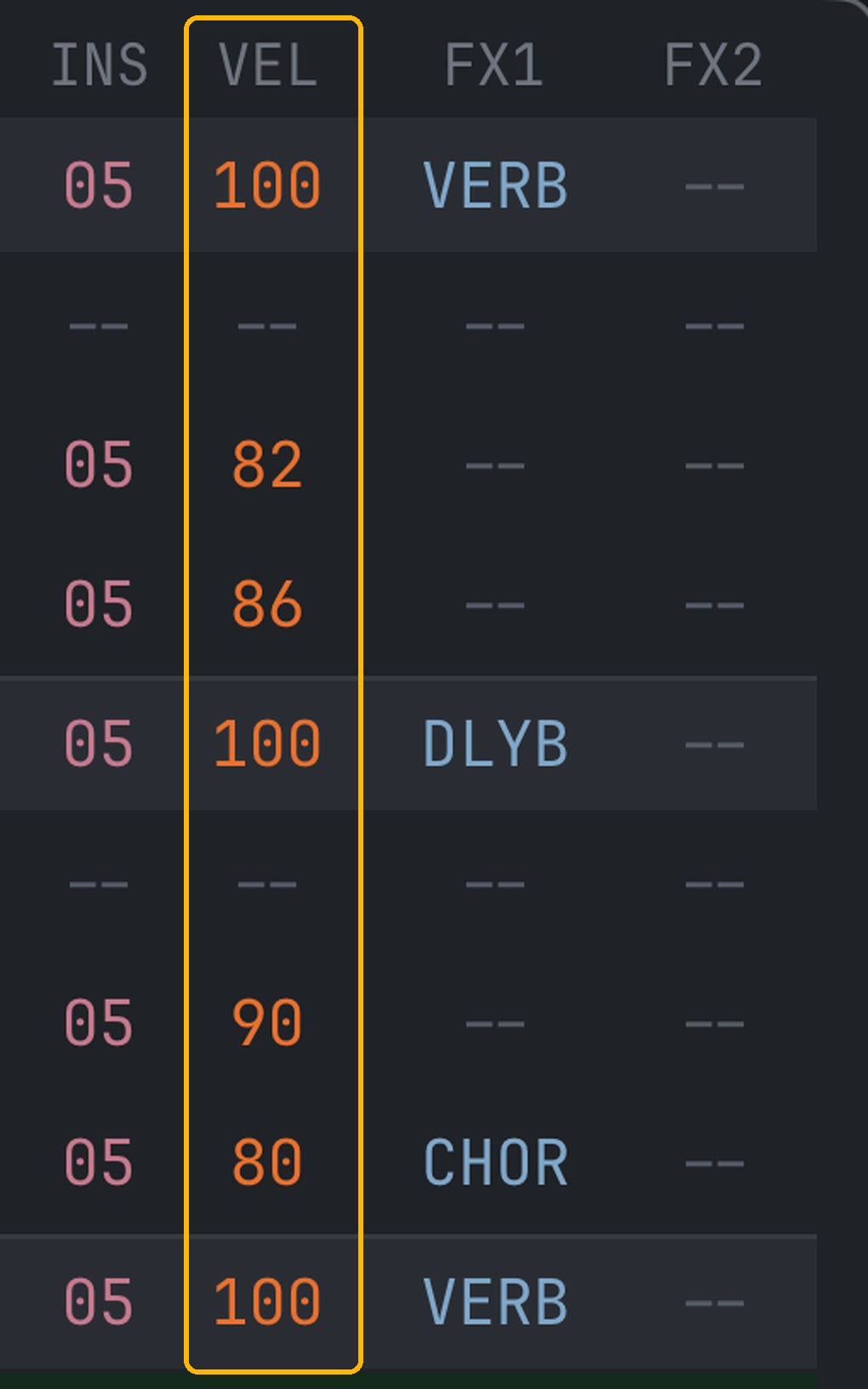
The header has ◀ ▶ to move between phrases, and rec and rec play to record. Below the grid sit three keys:
- EDIT opens SELECT, COPY and PASTE. With SELECT on, a tap selects a cell, the row number the whole row, a column header the whole column; COPY takes them (the whole phrase if nothing is selected). While something is copied, the cells a paste would write breathe in the grid at the cursor, so you see what you would get before PASTE writes it.
- PITCH opens NOTE ±1 (the cell under the cursor) and TRANSPOSE ±1 / ±12 (the selected notes, or the whole phrase).
- OFF writes a note-off into the cell.
Phrase length is 16 steps by default; PRJ can make it 32 or 64. rec is step recording: play a chord on a MIDI or typing keyboard and the cursor drops when you lift the keys — the step row under the grid sets by how much, 1, 2, 4 or 8 rows, and +1 / +2 skip ahead without writing. rec play loops the phrase and drops notes on the row that is playing.
Drum kits in the phrase
On a DRUM KIT instrument the note columns hold drums instead of notes, shown by their codes: KCK, SNR, CHH, OHH, HCP, CRS, RID, LTM, MTM, HTM. Hold a note cell and the list of the ten slots opens with the sounds the kit holds; a double-tap repeats the last drum. Up to four drums play on one row, each ringing on its own, and a MIDI drum pad's notes land on them directly.
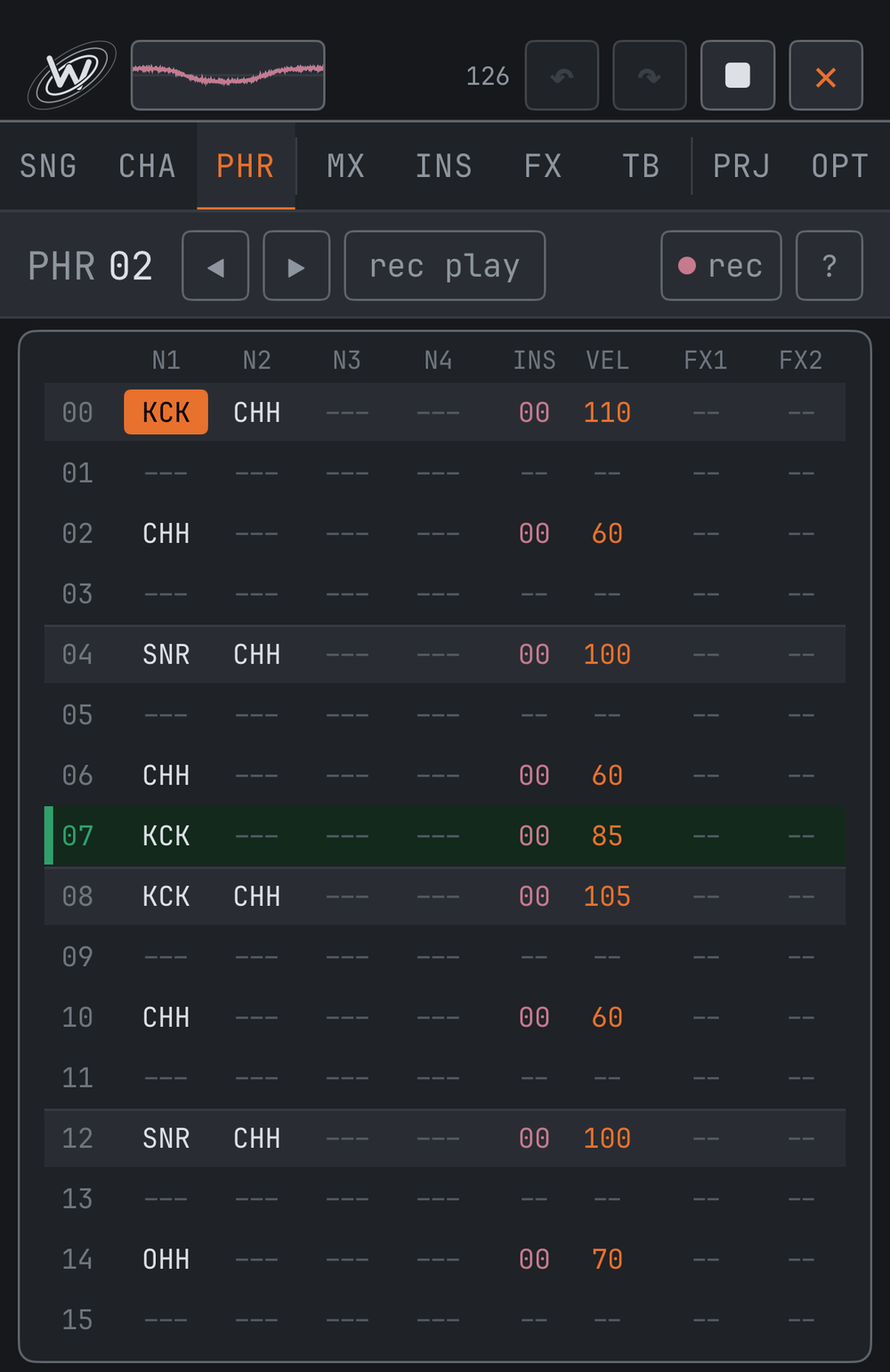
Phrases are also what LIVE MODE launches: anything written here can be played by hand in a set.
CHA · chain
A chain plays phrases in order, one per row — how a one-bar phrase becomes a longer part.
- PHRASE — which phrase this row plays
- TRSP — transposes that row in semitones. +12 is the same phrase an octave up; +5 moves it to the fourth. One phrase, four chain rows, four keys — a chord progression without writing anything twice.
Double-tap drops in the last phrase you used; hold a cell and slide to change it — across is the big step, an octave on TRSP.
SNG · song
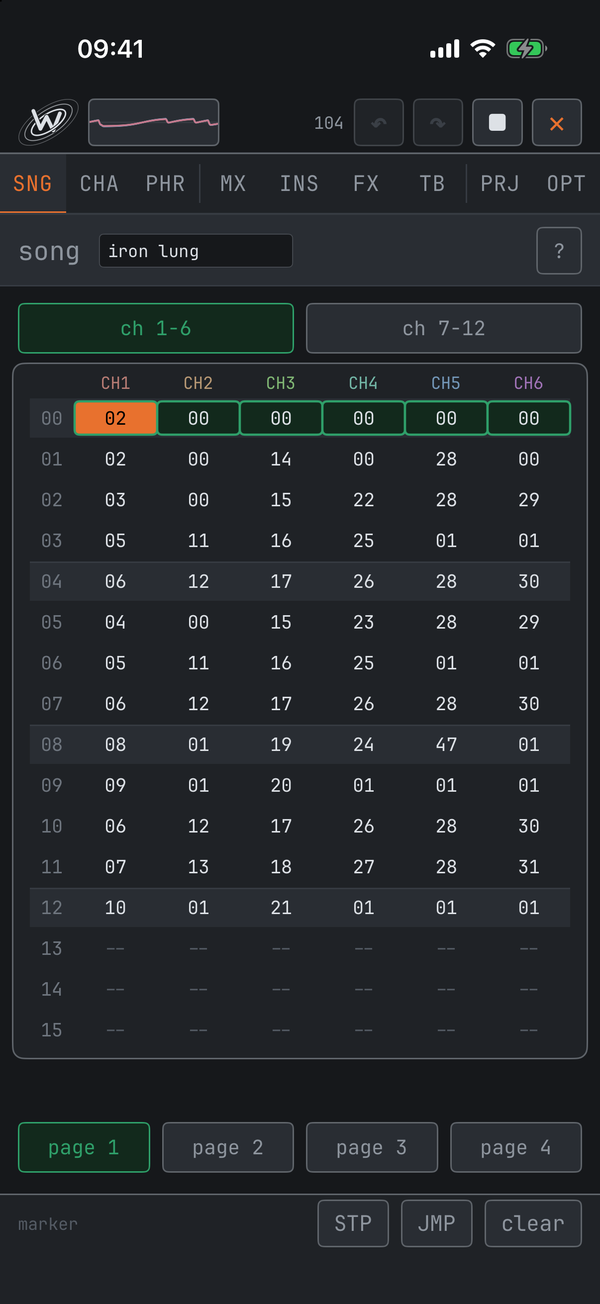
The top level: twelve channels side by side, each row one song step. Every cell points at a chain. On iPhone and iPad the channels are shown six at a time — the ch 1-6 / ch 7-12 buttons above the grid switch halves, and the mixer follows the same switch; the Mac shows all twelve. The song is 64 rows long; on iPhone the page buttons below the grid move through it, on iPad and Mac the whole song scrolls.
Channels are independent
All twelve channels share one clock, but each advances to its next row as soon as it finishes its own chain. A channel with a short chain moves on while a longer one is still playing. Nothing drifts, and you never have to pad parts out to equal lengths. An empty cell is simply silent and the channel moves straight past it.
STP and JMP
Two markers loop a single channel on its own — hold a cell and slide up past the last chain to reach them:
- STP — a silent loop-start. The channel resumes on the row after it.
- JMP — sends that channel back to the row after its nearest STP above (or row 0) and keeps looping.
A drum channel can loop four bars forever while everything else moves through the arrangement.
▶ plays the song from the top of the current page. When the song reaches its end, play stays on until the last sound has died away, then stops by itself.
MX · mixer
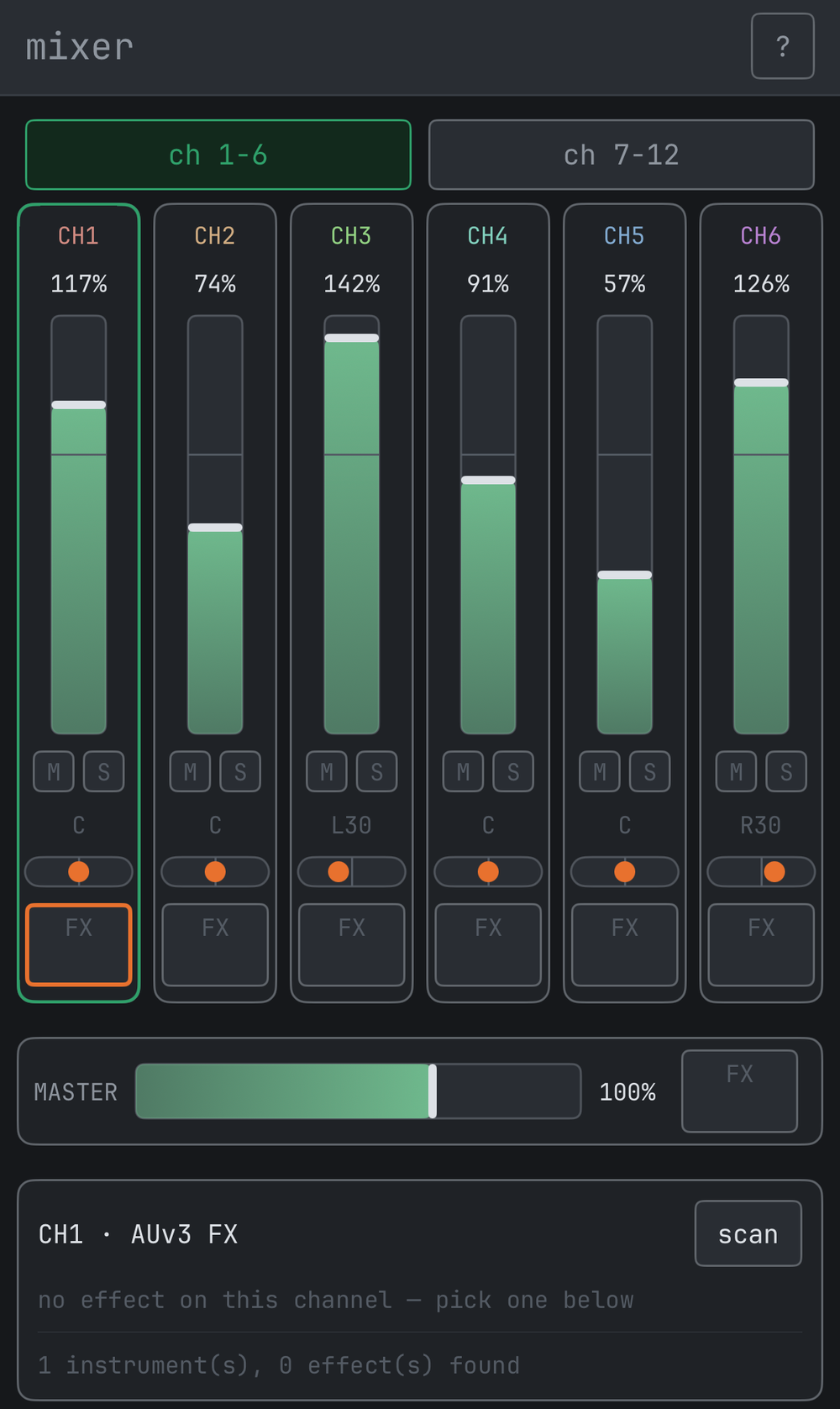
Per-channel levels for the twelve channels — six at a time on iPhone, with the same ch 1-6 / ch 7-12 switch the song page uses, and all twelve plus the master in one row on iPad and Mac. Each strip has a volume fader, mute / solo buttons and a pan control — press, hold and slide any of them.
- Volume runs 0–150%; the line two-thirds up the fader is 100%, unity
- M mutes, S solos — solo wins, so only solo'd channels are heard
- Double-tap a pan control to re-centre it
- These settings are part of the song and save with it
MASTER
On iPhone and iPad the MASTER row sets the level of the whole song, 0–150% — a sideways bar on the iPhone, a fader beside the channels on the iPad. It works on the mix after the master insert and before the final soft clip, so a loud song can be brought down without touching the balance. On the Mac the mixer shows a level meter on every strip and the master instead.

AUv3 effect inserts
The FX button at the bottom of each strip is an AUv3 effect insert — a third-party plug-in (reverb, EQ, compressor…) in that channel's signal path. Grey is empty, lit is loaded, an amber outline marks the slot the panel below is showing. Under the visible strips sits one more: MASTER, an insert on the whole mix. A hosted AUv3 instrument passes through its channel's insert like every built-in voice. Each slot has byp (bypass — tails ring out naturally), clear, and a dry/wet blend. Plug-in patches save inside the song; latency from look-ahead plug-ins is compensated automatically so the channels stay locked; render wav includes it all, tails and all.
INS · instrument
The sound a note plays with. Instruments are numbered 00–63, and a phrase row's INS column points at one of them. The header reads ins ◀ 00 ▶ global presets: ◀ ▶ switch instruments, a tap on the number lists all of them, and global presets opens the sound library (see Sounds & presets).
- engine — tap the engine's name for the list of every engine, A to Z. Everything below changes with it. The circled ▶ at the end of the row plays the instrument with one tap (five seconds at most; lit while it sounds).
- engine preset — ready-made sounds for the current engine, its volume too: ◀ ▶ step through them so you can listen, a tap on the name lists them all, and the save key at the end of the row keeps the sound under a name of yours.
- vol / pan — the instrument's level, to 150%, and its place in the stereo field.
- − + nudge any value; press and hold to sweep.
Sections every engine shares
| AMP ENVELOPE | attack, decay, sustain, release — plus hold. With hold on, sustain stays at its level and the note fades over the release time when it ends: a real ADSR. With it off, sustain slides down on its own, which is how the app has always behaved and what existing songs are written against. |
| FILTER | low-pass, with cutoff and resonance — and on SAMPLE a high pass beside it |
| LFO | moves pitch, filter, amp or pulse width, with rate, amount and a wave: sine, triangle, saw up, saw down, square, random or smooth random. A marker rides along every moving row while it plays |
| GROOVE | this instrument's timing feel: a preset swing, or open the editor and write how many ticks each step takes — 48 is straight at 192 PPQN, an uneven list is swing. Only the instruments you set are swung. |
| SCALE | locks this instrument to a key — pick a root and a scale. picker offers only in-key notes on the slide (and chords on the wheel); strict snaps every entry — typed, nudged or recorded — to the nearest in-key note |
| TABLE | attaches a TB-page table; tbl rate sets how many ticks each table row lasts (48 = one step) |
| retrig (MODAL) | what a note struck while the bar still rings does to the envelope: restart begins it again from silence, ring carries on from the level it had reached |
Sounds & presets
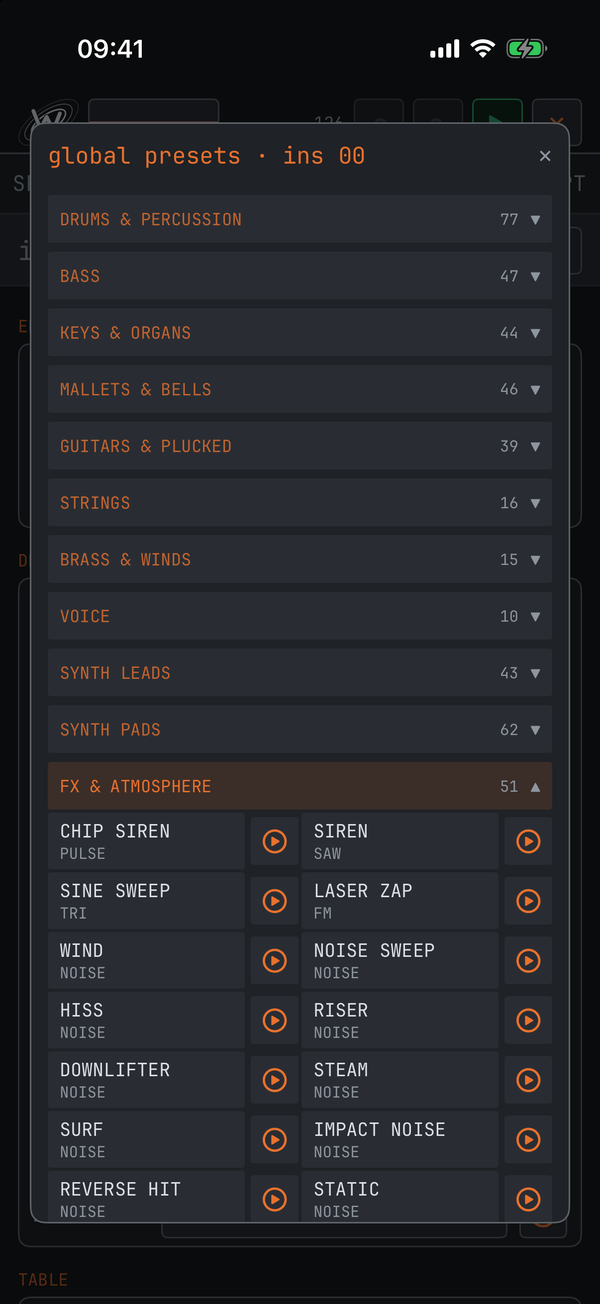
global presets on the INS page opens the sound library: over 450 ready-made sounds across every engine, sorted by what they are rather than by how they are made.
- Eleven families — drums & percussion, bass, keys & organs, mallets & bells, guitars & plucked, strings, brass & winds, voice, synth leads, synth pads, fx & atmosphere. Each family is a fold; the window opens on the family of the sound you have.
- Hear it first — the circled ▶ at the end of a row plays the sound through by itself, without touching your instrument. A tap on the name puts it on the instrument: the engine and the preset in one go.
- One loudness — every sound is balanced to the same level, so switching never jumps out of the mix.
- Your own — the save key on the engine preset row keeps the sound as it stands under your name. Your presets sit first in both windows, under USER PRESETS, each with a ▶ and a delete key that asks first; a kit keeps its samples.
- WOVEN carries 96 classic DX7 patches in its own preset list.
The 21 engines
The classics
| PULSE | square / pulse with adjustable width — the chip lead |
| SAW | bright and buzzy; the workhorse bass and lead |
| TRI | soft, hollow, gentle |
| FM | two-operator frequency modulation: bells, basses, clangs |
| NOISE | percussion and effects |
| PAD | supersaw stack — wide and warm |
| SUB | deep sine-ish bottom |
| PLUCK | short plucked string |
| WTABLE | wavetable — drag in the editor to draw your own single cycle, then sweep through it |
| MODX | dual-oscillator synth with a four-LFO modulation matrix — the deepest of the classic set |
DRUM and DRUM KIT
| DRUM | an analog drum voice. Pick the model — kick, snare, clap, hats, tom, rim, cowbell, clave, cymbal, shaker, ride — then tune, decay, tone and snap. Every model plays its own pitch at C-4, so the note you type is the right note. |
| DRUM KIT | ten drum slots in one instrument — KCK SNR CHH OHH HCP CRS RID LTM MTM HTM — each holding any sound from the library or a loaded sample. Its engine preset row holds whole kits: eight built in, balanced against each other, and the save key keeps your own, samples included. Tap a slot for its own page: sound, sample, level, pan, tune and a ▶. In the phrase the kit's cells show the codes (see PHR). |
SAMPLE
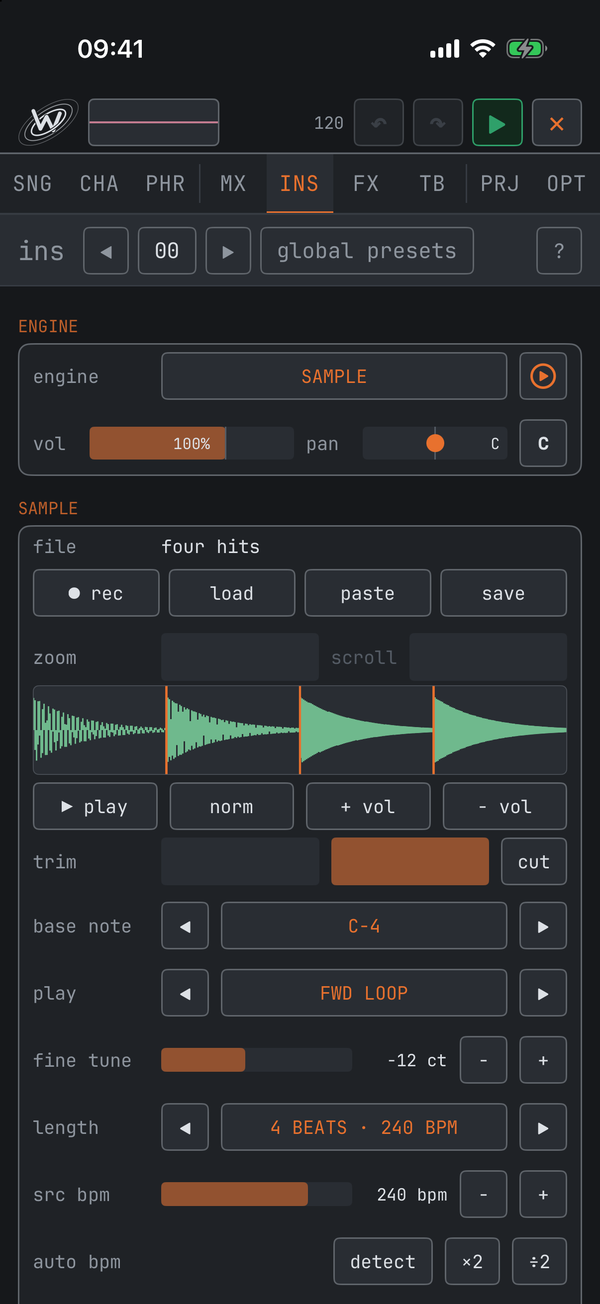
A recorded or loaded sound. ● rec records from the mic with a 3-2-1 count-in, up to 15 seconds; load imports an audio file.
- Under the file row: ▶ play previews the current selection, norm normalises, + vol / − vol adjust, and the trim sliders plus cut crop it
- base note is the note that plays the sample at its original pitch
- play mode: one-shot, forward loop, ping-pong or reverse — and it applies to each chop slice too. start and end choose the part of the sample that plays. Every start, stop, loop wrap and cut is faded, so nothing clicks; fine tune moves the pitch in cents, and FILTER's high pass thins the low end
- length / src bpm / auto bpm make the sample follow the song tempo: say how many beats it holds, or the tempo it was recorded at, or let detect read both off the audio. Then tempo chooses how: vinyl turns it like a record, pitch and all; stretch keeps the pitch and re-times the sound with overlapping grains — grain sets their length, short for drums, long for held notes
- save writes the edited sample out as a WAV with the chop points as markers; resample renders a channel — a phrase or its whole part — through its effects into this instrument. Audio also arrives from other apps: paste, a file dropped on the section, or "open in WBTRK Studio"
- Chopping: chop splits into equal slices; beat-chop plus detect auto-slices at every transient — drag sensitivity for more or fewer. Each slice plays from the base note up the keyboard, so a drum loop becomes a playable kit. Drag the amber lines to nudge slice points; clear removes them all. gap-chop slices after every silence instead, for one-shots recorded in a row. slice play picks a hit's slice by note, round robin or at random; slice loop sets where inside a slice a loop comes back to.
- Four hits at once: the four note columns are four read heads, so kick, snare, hat and cymbal can sit on one row of a chopped break and play together, each at full level.
GRAIN
A granulator playing tiny slices of this instrument's sample (record or load one under GRAIN SOURCE). size sets grain length, density how many per second, position where the playhead starts, and speed how it moves — +1.00x is normal, freeze holds one spot, negative runs backwards. spray scatters grains, pitch ± transposes each one randomly, shape skews the grain fade.
MODAL
A struck resonator — mallet instruments, bells, bars. structure morphs harmonic into stretched bell partials, brightness tilts the high modes, ring time sets how long it rings, and strike pos moves the strike point: some positions silence certain modes, exactly like hitting a string at its middle. MODAL has a second LFO that reaches its own controls, and a retrig switch (see the INS rows above).
SPEECH
A talking and singing robot with 56 word slots (W00–W55).
- voice: otto (male), igor (deep), ada (female), pip (small and breathy)
- talk — the note picks the word: C-4 plays W0, C#4 plays W1, and so on; pitch sets the voice
- sing — the note is the melody. The voice sings at that pitch, holds the word's vowel while the note lasts, and finishes the word when the next note arrives.
- lyrics — N1 picks the word, N2 is the sung note, so a phrase becomes a lyric sheet with its own melody. A row with only one note bends the word still singing to that pitch: one syllable carrying a whole line, which is melisma.
- Building words: type it how it sounds in the spell field (HEH-LOH, KUM-PYOO-TER) and tap make. Or tap sounds in the SOUNDS grid by hand — the classic 59 speech-chip allophones, with PA1–PA5 as pauses. Japanese words work too, typed as kana or romaji.
The ambient set
Three engines built as fixed eurorack patches, with the real module names on the panel. Each holds indefinitely, so they are made for beds and drones rather than hits.
| DRONE | three oscillators → wavefolder → low-pass gate. Each VCO has its own wave, octave, coarse interval, fine tune, level and pan, so one note spreads right across the stereo field. The wavefolder adds harmonics as you push it; the LPG opens brightness and level together, the way a real gate does. |
| RESONATOR | an exciter striking a tuned resonant loop. strike and bow choose how it is excited — plucked, or bowed and continuous — and geometry, brightness, damping and position shape the body: plucked string, bowed metal, blown pipe. |
| TEXTURE | noise through two resonant filters into an LPG. colour sets the noise; each filter has frequency, Q, level and pan, and track decides whether it follows the keyboard or stays fixed. Fixed is weather; tracking is a breathy voice. |
All three read rise and fall in the FUNCTION section — long, slow envelopes rather than instant attacks.
ROUND and WOVEN
Two engines built on open-source Eurorack DSP (the credit is under OPT → ABOUT → licences).
| ROUND | a resonator with its own exciter — every note is a strum. model picks what rings: a modal bar, sympathetic strings, a plucked string, an FM voice, a quantized string chord or a string in a hall. voices is how many strums ring at once (a chord always gets one each); structure, brightness, damping and position are the resonator's own controls; width spreads its two outputs left and right. |
| WOVEN | a macro-oscillator with 24 models — analog, FM, wavetable, chords, speech, drums and more — under three controls: harmonics, timbre and morph mean something different in every model, so turn them and listen. Its LPG section is the module's own decay and low-pass gate; aux out blends in the model's second output. On the chord, string-machine and chiptune models, harmonics picks the chord — the row names it and the piano lights it. |
Both carry the full AMP ENVELOPE on top of the core's own ring or gate, so a long-ringing resonator can be cut short, or held for as long as you like.
Two more engines play something else instead of a voice of their own:
AUv3
Host an installed plug-in instrument. scan finds them, tap to assign, open shows the plug-in's own interface, and each instrument slot can host its own. A plug-in only registers with iOS after its own app has been opened once — sometimes a reboot is needed before it appears. Its notes play through the plug-in and then through its channel's strip and insert like a built-in voice, and the FX column's audio effects — filters, delays, reverbs, drive, chorus, FOGGY — PAN, and the row-level OFF, CUT, TEMPO and RANDOM apply to it. What works inside a built-in voice — the pitch, amplitude and timing effects, RETRIG's re-hits — cannot reach a plug-in; the grid strikes those through on an AUv3 row.
MIDI OUT
The instrument plays external gear instead of a built-in voice: place it in the grid like any other instrument, and its notes drive a synth on the other end of a cable (or the network).
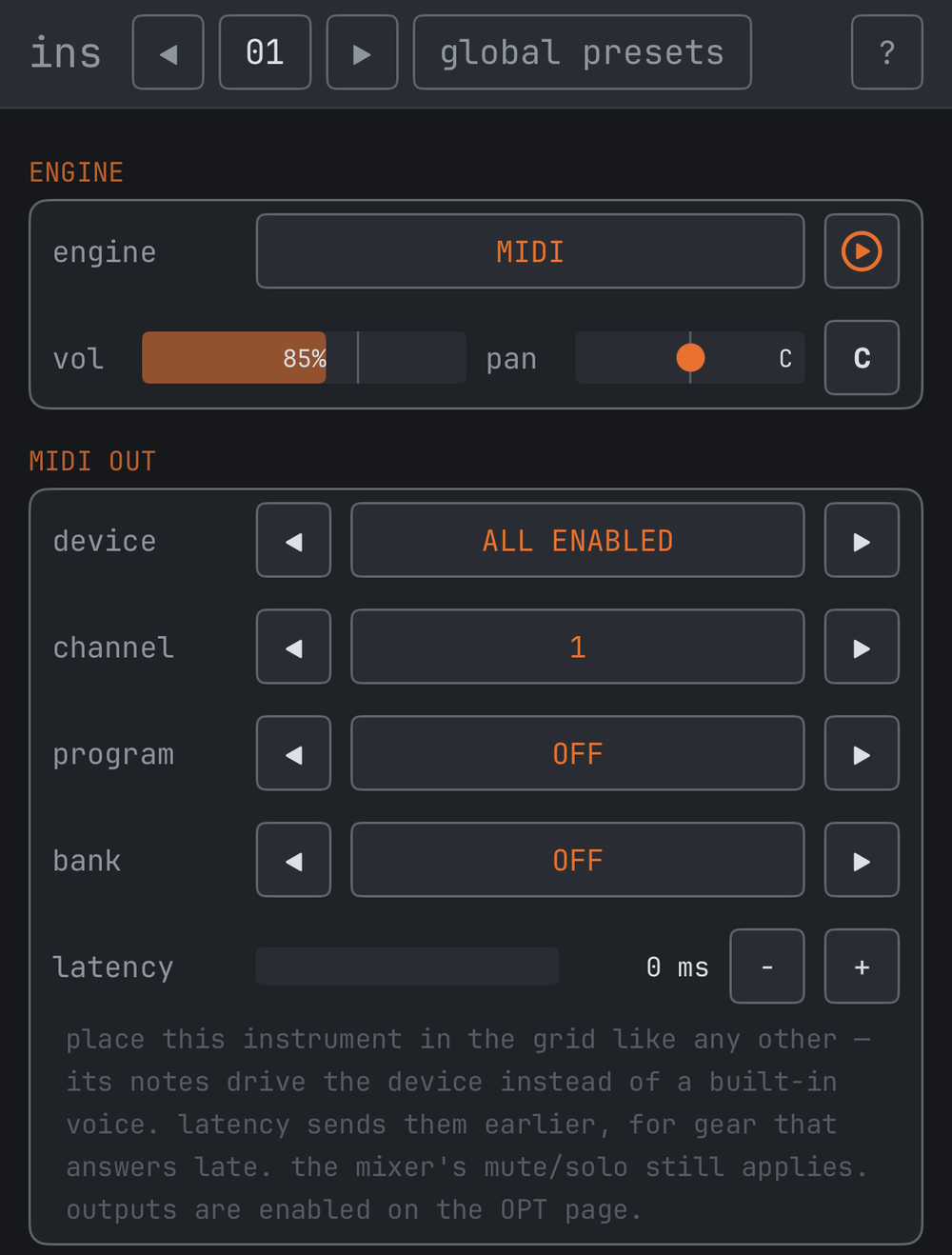
- device — one named destination, or all enabled (manage destinations on OPT)
- channel — MIDI channel 1–16
- program / bank — optional; sent once whenever they change, so your synth switches patches by itself
- latency — sends this instrument's notes earlier by up to 80 ms, so hardware that answers late still lands on the beat
Notes hold until the channel's next note, an OFF or a CUT (which also sends all-sound-off), like every tracker note. Mute and solo on the mixer gate the gear exactly like the speakers, and the ENGINE row's ▶ and keyboard-thru go out to the hardware too. Of the effects, only OFF, CUT, TEMPO and RANDOM reach it.
FX · effects
The FX page builds numbered slots. A phrase row's FX1 or FX2 column points at one. Slots are shared: every row pointing at the same slot changes together, so editing one slot changes the whole song at once — that is the point. The 4-character name you give a slot is what the phrase page shows; a tap on the slot number in the header lists every slot, and a tap on the type's name lists all 31 effect types, A to Z. Every effect belongs to the note it is written on and rings out in full — a later note never cuts its tail.
| effect | what it does |
|---|---|
| LPF / HPF | low- and high-pass filters, with resonance |
| DELAY | time, feedback, wet, tone — and tempo sync, with dotted values |
| REVERB | size, damp, wet |
| XL REVERB | the big one: decay from half a second to thirty, with pre-delay, damping and a modulated tail |
| BITCRUSH | bits, sample rate, drive, mix |
| DISTORT | drive, tone, level |
| ARP | arpeggio: two extra intervals, speed and mode — plus gate (how much of each step sounds, 10–90%) |
| SLIDE-UP / -DN | pitch slide from the note — with target: 0 slides forever (the classic), a value stops after exactly that many semitones and holds ("bend up a fifth") |
| VIBRATO / TREMOLO | speed and depth, on pitch or on level. Vibrato adds delay — the classic synth LFO ramp-in, the wobble arriving after the note settles — and both have a wave selector (sine, triangle, square, random) |
| PORTA | portamento — glide from the previous note |
| PITCH-OFF | detune in cents |
| VOL-SLIDE | fades the note up or down while it plays |
| NOTE-DLY | delays the note's start inside the step — the classic way to push a hit off the grid |
| NOTE-CUT | cuts it short inside the step |
| PAN | places the note in the stereo field |
| CUT | the hard stop: stops the instrument outright, release and all. The channel's delay and reverb keep ringing. (The stop that lets the release play is OFF, in the note column; older songs carry it as the KILL effect, which still works.) |
| RINGMOD | ring modulation: frequency and mix — or key-track, tuning it to the played note (0.5 = the fundamental) |
| WAVEFOLD | drive, fold, bias, mix |
| GATE | trance gate — rate, depth, duty, with tempo sync |
| COMB | comb filter: frequency, feedback, damping — with the same key-track mode as RINGMOD |
| AUTOPAN | rate, depth, tempo-syncable |
| FLANGE / CHORUS | rate, depth, feedback / mix — flange adds a dry blend |
| RETRIG | re-hits the note 2, 3, 4 or 8 times inside the step, with a volume change per hit |
| RANDOM | rolls fresh dice every time a note with it plays. Turn on any target — pitch, volume, envelope, pan — and give each a chance of happening and a range. |
| TEMPO | shifts the speed of the channel this phrase plays on by a ± BPM offset. All channels still share one clock, so they stay locked — just at different rates. |
| AUT | automation. Put it on a row next to the instrument and the effect you want to morph from. The next row with a different instrument of the same engine — with a note, or the instrument alone, so a held note or a drone morphs without being struck again — and the next different slot of the same effect type are the to: the values travel there across the rows between. ins / fx choose which parts move; length is next (arrive at the target's row) or phrase (run on to the last row, point to point through further changes); curve is linear, exp, log, S-curve, step or hold, and amount bends exp and log |
| FOGGY | a granular texture effect built on open-source Eurorack DSP. It records the note into a short buffer and plays it back as clouds of grains: mode granular, stretch, loop delay or spectral; position, size, pitch (±24 semitones), density, texture, mix; freeze keeps playing what was captured, feedback cascades, reverb adds the module's own |
TB · tables
A table is a small program that runs alongside every note of any instrument it is assigned to, row by row, looping.
- TRANSP re-pitches the note per row — try 0 / +3 / +7 for an instant arpeggio
- VOLUME shapes per-row loudness — a tremolo, or a decay
- FX switches an effect slot on for that row
Attach a table with the table parameter on the INS page; tbl rate there sets how many ticks each table row lasts — 48 is one phrase step, and it follows the tempo.
PRJ · project
- bpm — the song tempo: − + step it, a tap on the number types it in (a whole number, 20 to 400), and tap sets it from the speed of your taps
- phrase length — 16, 32 or 64 steps
- save now / load saved — a manual checkpoint. Snapshot before a big change, reload to discard it.
- save song / load song — save and open a .wbtrk file. On iPhone and iPad both start in the folder you used last. Files are named after the song name on the SONG page.
- share song — sends the song by AirDrop, Messages or Mail
- render wav — bounce the whole song to audio, at 16 or 24 bit (16 is dithered), with every AUv3 insert and every tail rung out: the file ends where the sound does
- play full screen — the song under a full-screen visualiser: wave, rings, spectrum, starfield or XY scope, in your theme's colours. Swipe sideways for the colours, up and down for the visual
- live mode — opens LIVE MODE
- export midi — the song as a standard MIDI file: one track per channel, real note lengths and velocities. Open it in Renoise, Ableton, Logic — any DAW.
- render stems — each channel as its own wav. Pick the channels in the list (they start unselected), render, and every stem arrives in one share sheet. All stems are the same length, so they line up when you drop them into a DAW together.
- new song; the demo, night market, is a file in the app's own folder under load song — half a minute on seven channels with a DRUM KIT
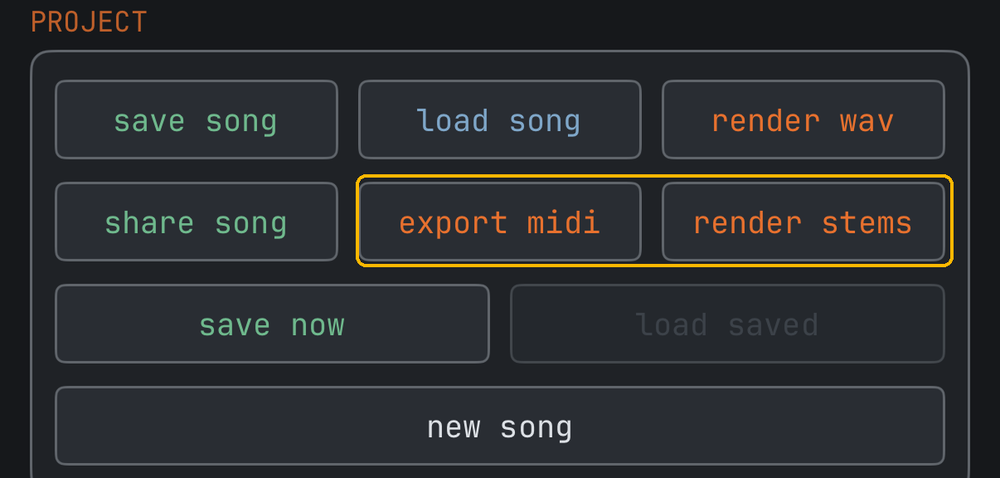
Your working song also autosaves on its own and reopens at next launch. Below the buttons, SONG counts what the song uses — phrases, chains, rows — and its playing time.
OPT · options
- APPEARANCE — 28 themes on ◀ ▶; on iPhone and iPad a tap on the theme's name lists them all. STUDIO and STUDIOLIGHT are one look, dark and light, and follow light / dark setting switches with your device. THEME EDITOR, folded below, builds your own: tap any colour row, drag R/G/B and watch the app re-colour live. Editing a built-in forks an editable copy; themes export and import as .wbttheme files.
- FONT — seven faces, on ◀ ▶ or from the list under the name. CLASSIC and BOLD are the system mono; TERM, ARCADE and PIXEL are bundled retro faces; PLEX and JET (IBM Plex Mono, JetBrains Mono) read like studio gear. Sizes are matched so the layout never shifts.
- LANGUAGE (iPhone and iPad) — English or 日本語; AUTO follows the device. The tracker's own labels stay in English in both. The Mac is in English.
- MIDI — devices, keyboard thru, keyboard velocity (off: every key plays and records at full), live record writes OFF on release (a held note ends where you let go), count-in, MIDI out and MIDI clock
- SYNC (iPhone and iPad) — Ableton Link. See Ableton Link.
- TRANSPORT — panic silences anything stuck, including plug-ins and external gear. lock screen player puts the song on the lock screen and in Control Centre with cover art in your theme's colours; turn it off to keep WBTRK Studio out of both. haptics is LIVE MODE's tactile feedback, iPhone only. preview while editing sounds every edit of a phrase cell; off, editing is silent.
- CONTROLLER and KEYBOARD — folded; the connected game controller and the typing keys, one row per job, set by pressing the button or key you want. See Keyboard & game controller.
- LEGACY SETTINGS — at the bottom, folded. note entry: slide (the default) or the radial wheel. page order: SNG · CHA · PHR (the default) or PHR · CHA · SNG in the tab bar.
- ABOUT — version, feedback, the licences of the bundled fonts and engine code, and a link to rate WBTRK on the App Store.
On the Mac these settings live in the Settings window (⌘,).
LIVE MODE
A performance page on iPhone and iPad, opened from PRJ → live mode. Six scenes, one per channel, all sounding at once; every pad on a scene fires one of your phrases. Nothing you do here changes the written song, and closing it brings you back exactly where you were.
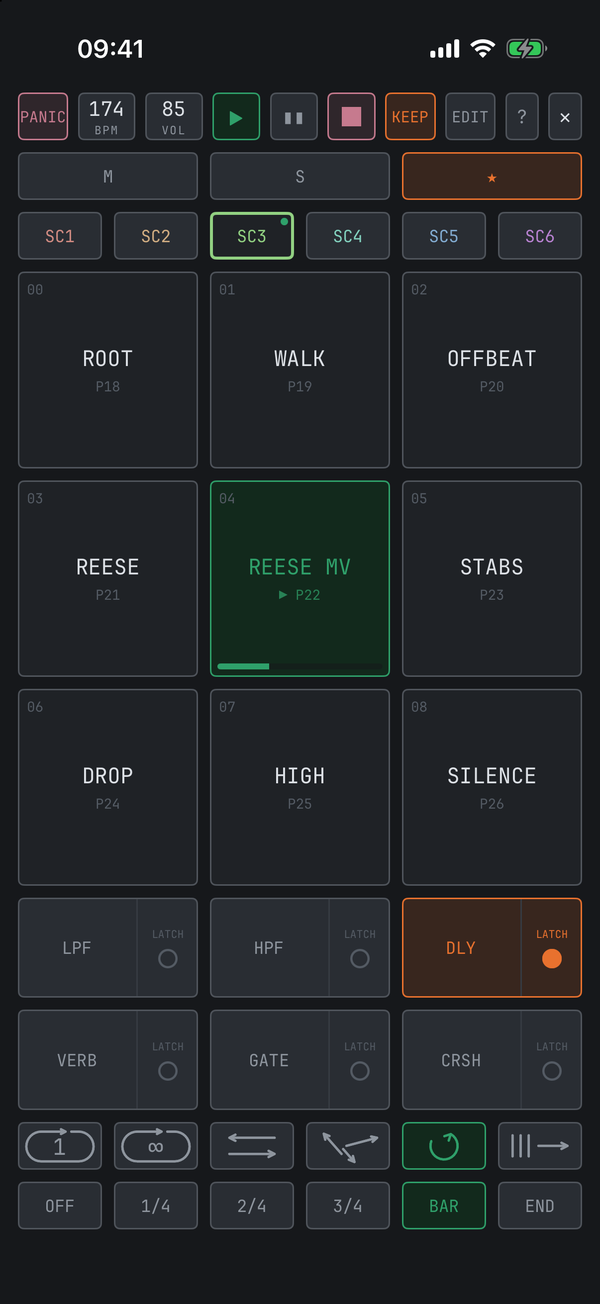
- EDIT — fill the pads: tap a cross to choose a phrase, tap a filled pad to change it, name the scene. The music keeps playing.
- Quantise — where a launch lands, counted from the master scene's bar: OFF plays the moment you tap; 1/4, 2/4 and 3/4 wait for that point of the bar; BAR waits for the bar line; END lets the phrase now playing finish first. Tapping a position on a scene that is already playing moves it there.
- Play style — queue (only what you tap, in order), once (slot 1 to the last, then stop), loop one, ping-pong, random, always (round and round).
- The effect keys — six per scene, two live at once. Every key is split: press its left part and the effect holds while your finger is down, for a stutter or a gate; tap the LATCH corner on its right and it stays on until you tap it again. They act on the scene's mix, mid-phrase.
- ★ — the master scene the whole set counts from. The first scene launched from silence takes it; give it to another and the grid follows.
- M mutes a scene in step; ■ takes it out of the set; BPM · VOL slide a fader out over the pads.
- KEEP — writes a take you liked back into the song.
LIVE MODE is touch only for now; the game controller's live button opens and closes it.
The Studio window: Mac & iPad
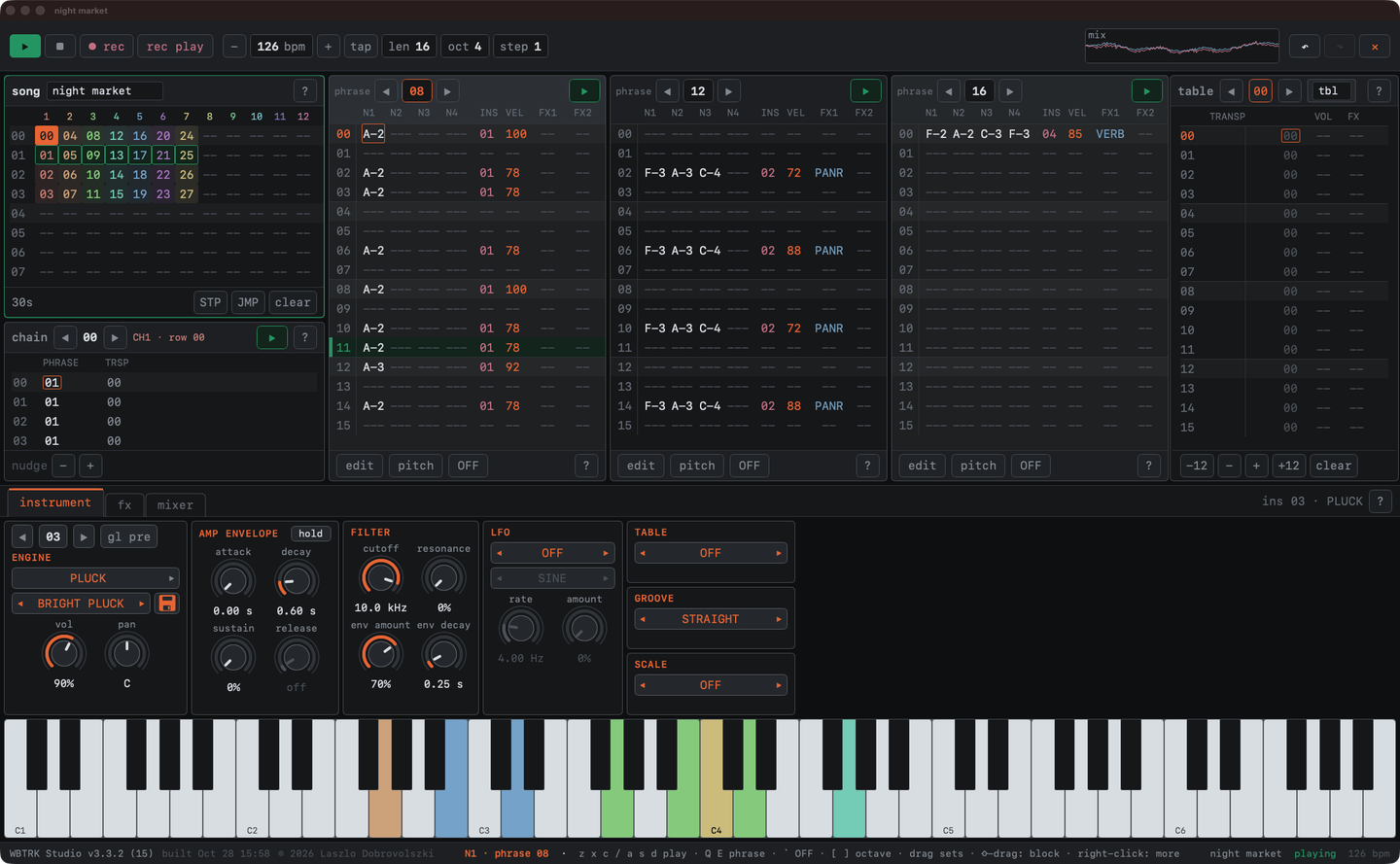
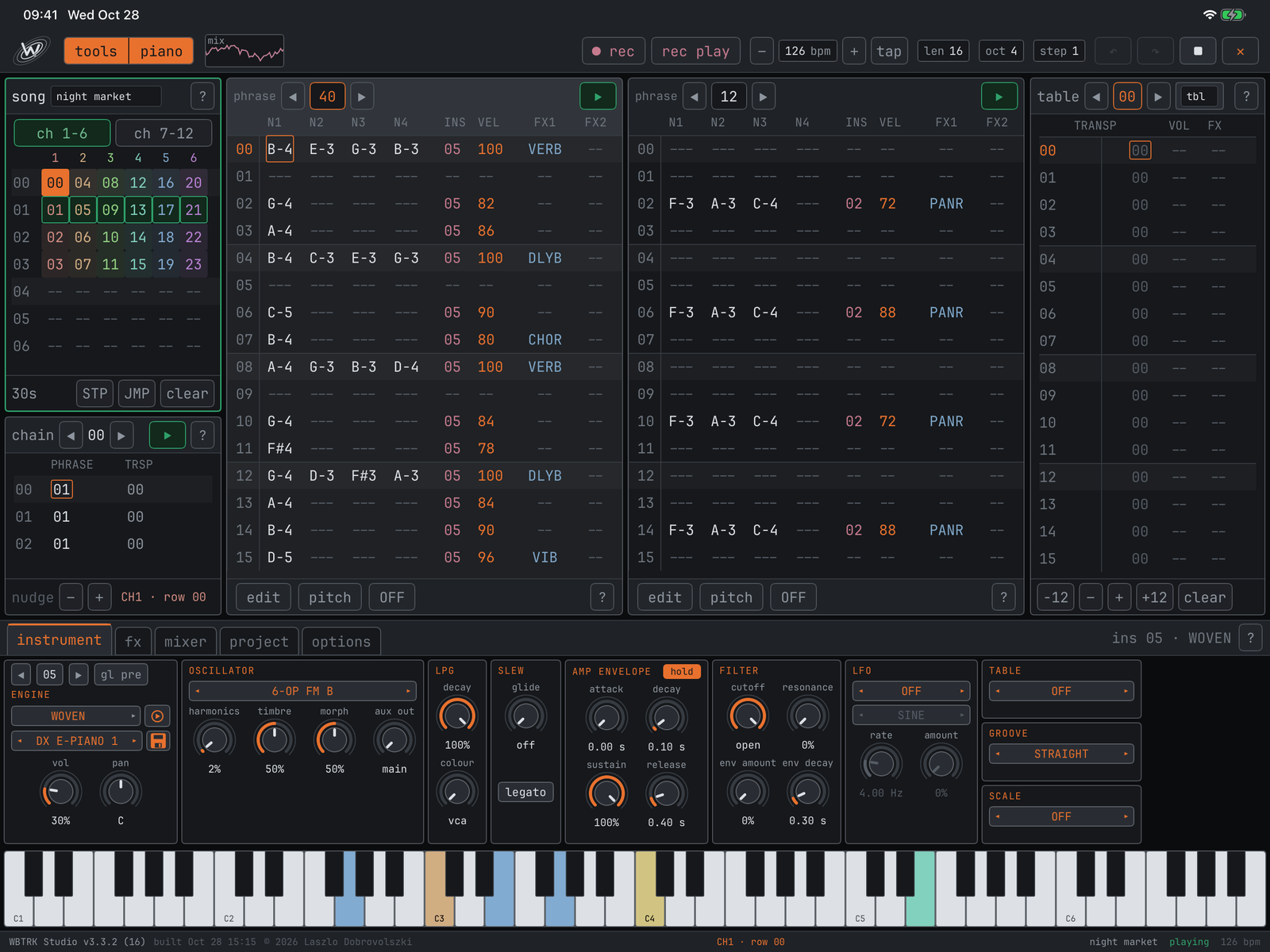
On the Mac and the iPad, WBTRK Studio puts the whole song in one window — the same app, one purchase for iPhone, iPad and Mac:
- the song at the top left, with its length and STP / JMP, and under it the chain the song cursor stands on — a click on a chain row opens its phrase
- three phrases side by side, each with its own selector, its own row numbers and its own ▶. A phrase belongs to no channel: moving in the song leaves the columns alone. While the song plays, every column whose phrase is sounding shows its play row
- the table in the right column
- the lower frame with its tabs — instrument, fx and mixer (on the iPad also project and options) — the instrument's sections side by side, scrolling sideways when an engine is wider
- a piano along the bottom that you can play, and that lights every note as it plays
On the Mac
- The window is one layout, zoomed as a whole: ⌘+ ⌘− from 75 to 175%, ⌘0 for 100% (View menu). ⌘K folds the piano away and the window gets that much shorter.
- The mouse: a click puts the cursor on a cell, a double-click fills or clears it, and a drag up or down steps its value — sideways for the big step. Drag a knob to set it, ⇧ for fine steps. ⇧-drag selects a block, across columns too; ⌘C ⌘X ⌘V, Delete, and ⌘↑ ⌘↓ to transpose it. A right-click offers set instrument, set effect and fill velocity.
- The keys — see Keyboard & game controller; on top, ⌥← ⌥→ jump a phrase column and ⌥↑ ⌥↓ step its phrase, and Tab moves the keyboard between the song, the chain, the phrases, the table and the lower frame.
- Files: the window's title is the song and its file. ⌘S saves into it, File › Revert to Saved brings it back, Open Recent lists the last ten, and quitting with unsaved changes asks. File › Export WAV / Stems bounce the song; Esc gives a bounce up. Audio dragged from the Finder onto the instrument tab becomes its sample.
- The mixer shows all twelve channels and the master with level meters, and the scope at the top shows the stereo mix. The Mac app is in English, and LIVE MODE and Ableton Link stay on iPhone and iPad.
On the iPad
The same window, in both orientations, worked by touch exactly like the iPhone — tap, double-tap, hold and slide. tools and piano in the top bar fold the lower frame and the piano away for more rows. With a keyboard attached the keys of Keyboard & game controller work; a game controller does too. In a narrow Split View the iPad shows the iPhone's pages instead.
Songs, samples and themes are the same files everywhere: a .wbtrk moves between the three by AirDrop, iCloud Drive or any share.
MIDI
Playing and recording
Connect a keyboard on OPT and it plays the app. On PHR, rec records it into the selected row, in one of two modes:
- rec (step) — play a chord and the cursor steps on when you lift all keys. The step row sets how far: 1, 2, 4 or 8 rows, so a beat on every fourth row goes in key after key; +1 / +2 skip ahead.
- rec play (live) — the phrase loops and notes land on the playing row as you play them. With live record writes OFF on release on, lifting the last key writes an OFF, so a held note ends where you let go.
count-in adds a four-beat lead-in before recording starts, and keyboard velocity off takes every key at full.
Driving hardware
Under MIDI OUT, enable a destination, then send playback out drives external gear from the sequencer and send midi clock sends start/stop and 24 PPQN beat clock so it stays in time. monitor shows the last message received, which is the quickest way to prove a cable works.
Ableton Link
On iPhone and iPad, Link shares one tempo with every Link app and device on your network — Ableton Live on a laptop, another iPad running AUM, a friend's phone. No cables, no master and slave: everyone follows the session.
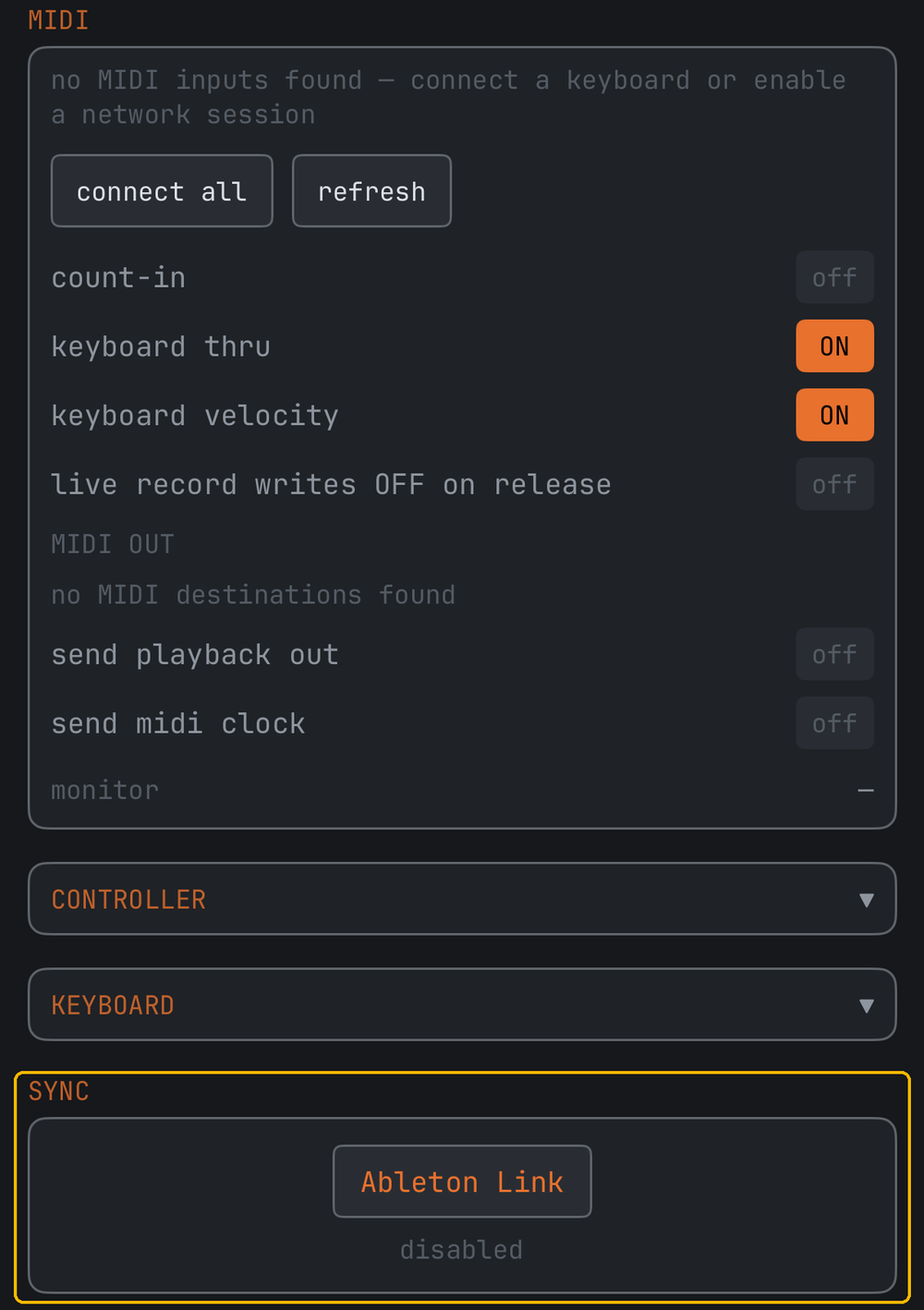
- Turning it on happens inside Ableton's own pane (the button opens it) — that is Ableton's rule for every Link app, so it works the same everywhere. The pane also has the optional start/stop sync toggle.
- Quantized launch — with Link on, ▶ waits for the session's next bar line, so the song enters exactly on the beat.
- Phase lock — while playing, WBTRK stays glued to the shared grid, not just the shared tempo. A peer joining mid-song pulls everyone onto the same bar.
- Tempo follows both ways — change the BPM in WBTRK and the session follows; change it anywhere else and WBTRK follows.
Link lives in the app. Inside a host (see below), the host is the clock.
The AUv3 plug-in
WBTRK is also an instrument plug-in. Add it inside AUM, Loopy Pro, Logic, Cubasis or Drambo, and the whole tracker — the real one, every page — opens in the plug-in window, wearing your theme.
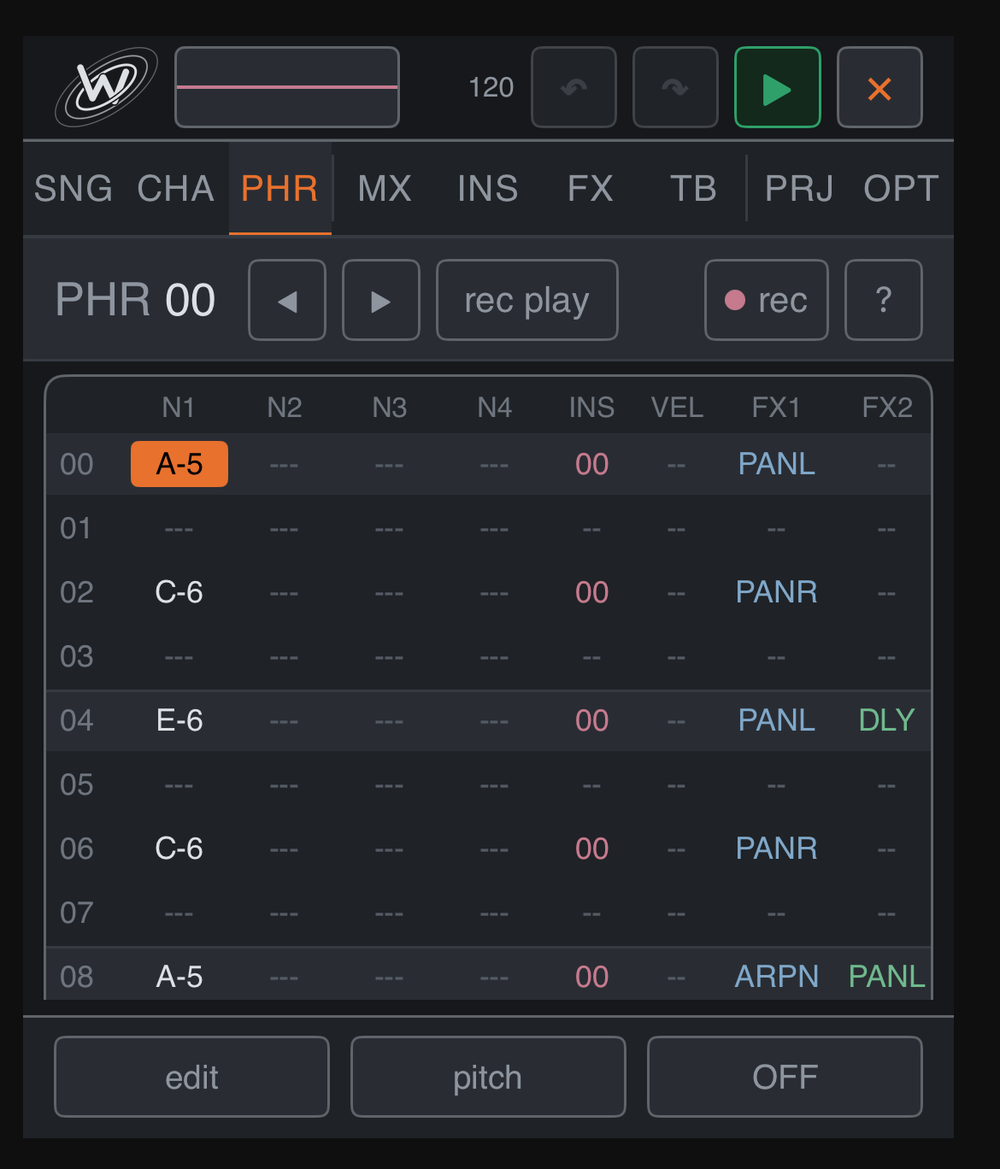
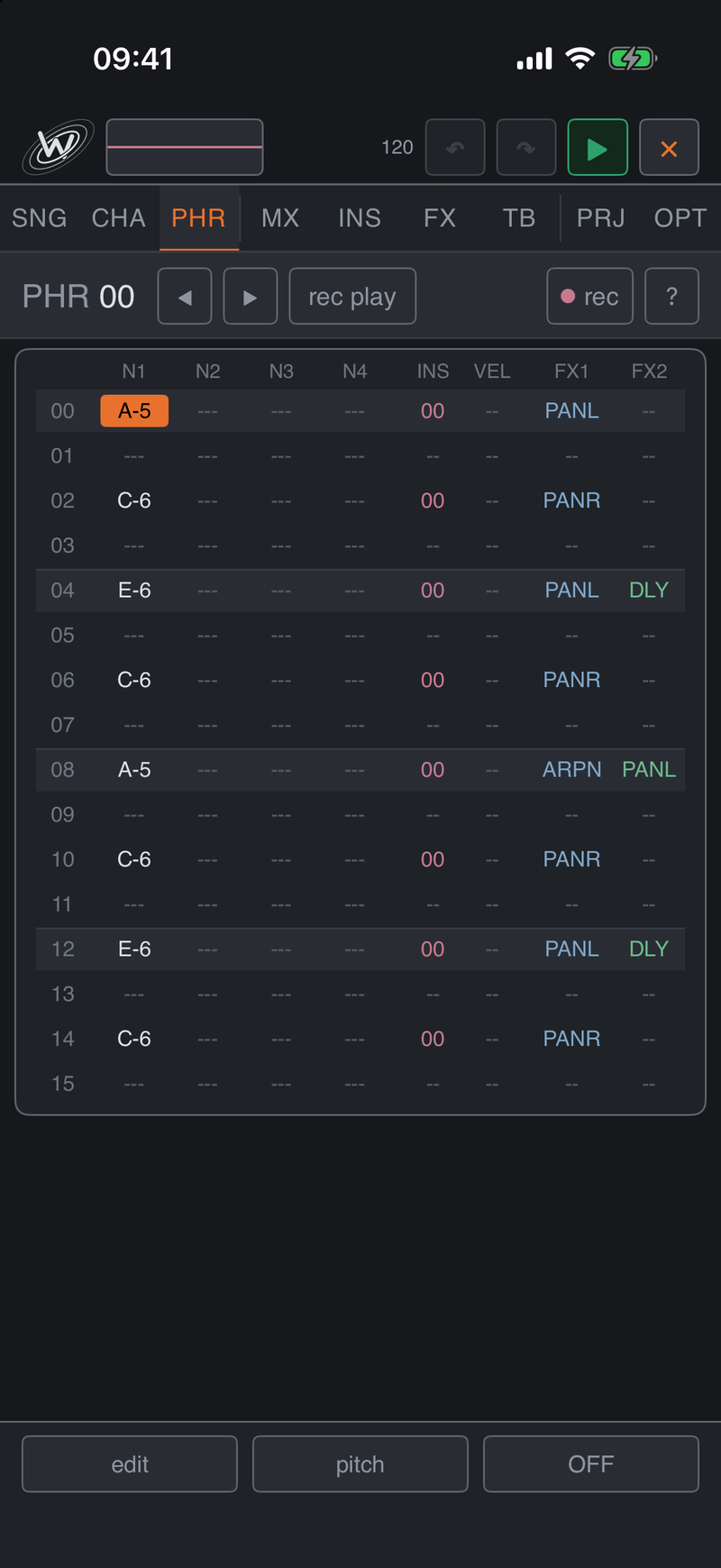
How it behaves
- Press play in the host and your song plays — following the host's tempo, and starting from the host's position: sitting at bar 9 starts WBTRK at song row 8, not from the top.
- Your song follows you in. A freshly added WBTRK opens with the song you last had open in the app. The host's session then saves and restores everything — samples included — entirely on its own.
- MIDI plays it live. Host keyboards and sequencers play the current instrument polyphonically across the channels, whether or not the song is running.
- Editing works. Write phrases, tweak instruments, mix — in the plug-in window, while the host runs. save song and the manual save now hand songs back to the app.
- What stays in the app: Ableton Link, MIDI in/out, mic recording and the AUv3 effect inserts — inside a host, the host provides sync, routing and recording. The pane says so where those panels would be.
Memory: every plug-in instance is a full WBTRK. iOS caps all instances of a plug-in together at roughly 380 MB, so keep sample-heavy songs to one or two instances.
Tips
- Write one phrase, transpose it in the chain. Four chain rows at 0 / +5 / +7 / +5 is a progression from a single phrase.
- Use one FX slot everywhere. Because slots are shared, changing one delay slot re-times every row that uses it — mix by editing slots, not rows.
- NOTE-DLY is your groove. A step or two of delay on a snare or hat does more for feel than any amount of quantising.
- Let channels breathe. Channels advance independently, so a three-row chain against a four-row chain gives you a shifting pattern for free.
- Queue phrases live. With the song playing, stepping to another phrase switches at the loop boundary — a performance tool, not a bug.
- Snapshot before you experiment. save now on PRJ, then wreck the song happily; load saved brings it back.
- Start from a sound. global presets has over 450 of them; tweak one and save it as your own instead of building from zero.
- End notes with OFF. An OFF in the note column lets a pad or a singing voice release right on the beat you choose.
FAQ
Will my old songs open in the new version?
Yes. New features store their settings in new fields, and an old song simply has none of them — which means the old sound. Where a release fixed how something sounded, an old song plays with the fix: since 3.2 a note played again while it still sounds no longer clicks, and SPEECH sings more clearly. The other direction is not safe: an older WBTRK opens a newer file but plays what it does not know as the nearest thing it has, so keep every device on the current version.
Is there a Mac version?
Yes — native, and included: one purchase covers iPhone, iPad and Mac. See The Studio window.
Where did the radial wheel go?
It is still there: OPT → LEGACY SETTINGS → note entry → wheel. Since 3.2 a held cell slides by default.
Where did hex numbers go?
Since 3.3 every number in the app is decimal, on every platform, and typed digits always mean what you see.
Can I use a game controller?
Any extended Bluetooth pad — PlayStation, Xbox, Switch Pro, MFi — on all three platforms. Map the buttons under OPT → CONTROLLER. A Siri Remote is not enough.
Why is an effect struck through in the grid?
That row's instrument cannot take it: an effect that works inside a built-in voice on an AUv3 plug-in, or anything but OFF, CUT, TEMPO and RANDOM on MIDI OUT. The audio effects, PAN and those four do reach a plug-in.
My kick gets quieter when I add a snare on the same row.
It no longer does — since 3.1 the hits in a sample row each keep their level. Chords on the synth engines are still normalised so they do not clip.
WBTRK doesn't appear in AUM / Logic / my host.
Open the WBTRK app once, then restart the device. iOS keeps a registry of installed plug-ins that updates lazily and occasionally needs exactly that nudge. Every AUv3 app shares this quirk.
Do songs move between the app and the plug-in?
Both ways. A freshly added plug-in opens with the song you last had open in the app. Inside the plug-in, save now / save song hand a song back. And the host's own session save carries the full song with it — samples included — independent of both.
Where are my song files?
In the Files app: On My iPhone (or iPad) → WBTRK Studio; on the Mac, load song opens the app's own folder. Exported .wbtrk songs, .mid exports and rendered stems all go through the share sheet, so you can send them anywhere directly.
The stems don't line up in my DAW.
They do — every stem is rendered at the same length from the same bar 1, tails included. Drop them all at the same position (bar 1) and they are sample-aligned. If something sounds offset, the DAW has probably trimmed leading silence on import; turn that option off.
My hardware synth plays late.
Give its MIDI OUT instrument some latency on INS — WBTRK then sends that instrument's notes earlier, so the gear lands on the beat. Start around 10–20 ms and adjust by ear.
How do I turn Ableton Link on?
OPT → SYNC → the Ableton Link button — the switch is inside Ableton's own pane, by their design, so it works identically in every Link app. Start/stop sync is a separate toggle in the same pane.
What does a blank VEL mean?
Full force. Velocity only changes anything when you write it — which is why every song made before the column existed sounds exactly as it did.
A note keeps ringing / something is stuck.
OPT → panic: all notes off, everywhere — built-in voices, hosted plug-ins and external gear.
How many plug-in instances can I run?
iOS gives all instances of a plug-in one shared memory budget (roughly 380 MB). WBTRK itself is light, but samples are not — with sample-heavy songs, stay at one or two instances. Watch the host's memory readout if it has one.
Is the plug-in a separate purchase?
No — it ships inside WBTRK. Install the app, and the plug-in is there in every host.
Something unclear, or missing here? Support page, or write to me — I answer everything.